Designing Lambda: A Minimal Yet Powerful Coding Agent

In this article I will cover the entire designing process of the coding Agent lambda and the coding harness: what they are, how they work, how different components interact and function together.
Try it out
Get started with Lambda Agent:
pip install lambda-agent
The Challenge
Building a coding agent is hard. The biggest challenge is managing context. If you don’t control it, token usage grows fast and the context window breaks.
Lambda is a minimal coding agent. You give it a prompt, and it can build different kinds of apps. It works in a similar way to tools like Claude Code and OpenAI Codex.
Lambda is not just a model. It is a harness that uses tools like reading files, writing files, executing commands, and searching a repository to build software.
How Lambda Works
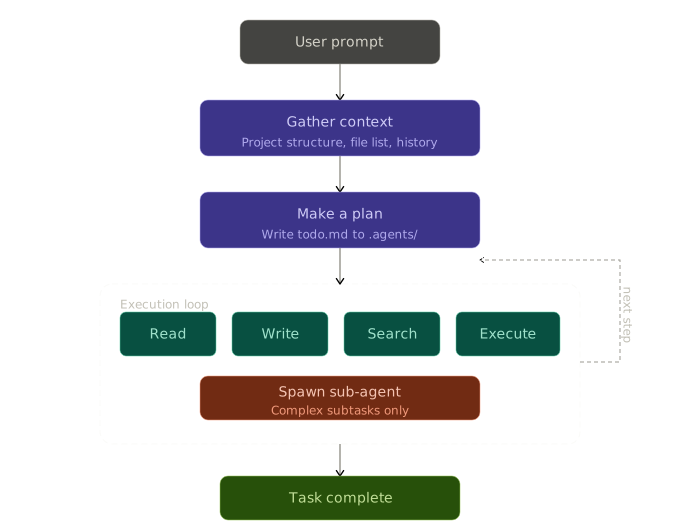
Let’s understand how Lambda works with a simple example.
Suppose you give a prompt like:
“Create an Instagram-like app with signup, login, posting, likes, follow system, and user profiles.”
Here is what happens step by step:
1. Gathering Context
First, the agent gathers context. It creates a workspace summary, which includes the project structure, file list, and relevant history. This summary is passed along with your prompt so the model knows where to start.
2. Planning
Next, the agent makes a plan. It breaks the task into smaller steps and creates a to-do list. This is written into a file like todo.md inside a .agents folder. This file acts as a guide during execution.
3. Execution
Then the agent starts working through the plan. It uses tools like:
- Read files
- Write files
- Search the repo
- Execute commands
For complex tasks, it can also spawn sub-agents to handle smaller parts of the work.
Memory System
Lambda uses both long-term and short-term memory.
Long-term Memory
Long-term memory is handled through three files:
- todo.md → tracks what the agent is working on
- scratchpad.md → used for notes, intermediate ideas, and extra details
- transcript.md → logs every loop of the agent for traceability
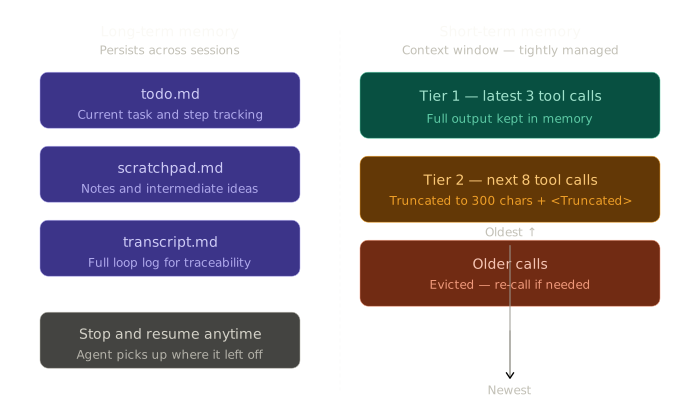
These files persist across sessions. You can stop work and come back later, and the agent continues from where it left off.
Short-term Memory
Short-term memory is the chat context window. This is where active reasoning happens, and it is tightly controlled to avoid overflow.
Context Protection
The biggest issue with coding agents is context explosion.
When the agent reads large files or too many files, the output becomes too big. This quickly fills up the context window and makes the system unstable.
Tiered Sliding Window Approach
To solve this, Lambda uses a tiered sliding window approach:
- Tier 1: The latest 3 tool calls are kept fully in memory. These contain complete outputs and give the agent fresh context.
- Tier 2: The next 8 tool calls are partially kept. Their outputs are truncated to 300 characters, with a
<Truncated>tag at the end. - Older calls: Any tool call older than these is removed from the context. If needed, the agent can call the tool again.
Sub-agents
There is one more layer of protection.
Instead of doing everything in a single context, Lambda spawns sub-agents for smaller tasks. Each sub-agent gets only the minimum context it needs. Once done, it returns only the final result, not the full process.
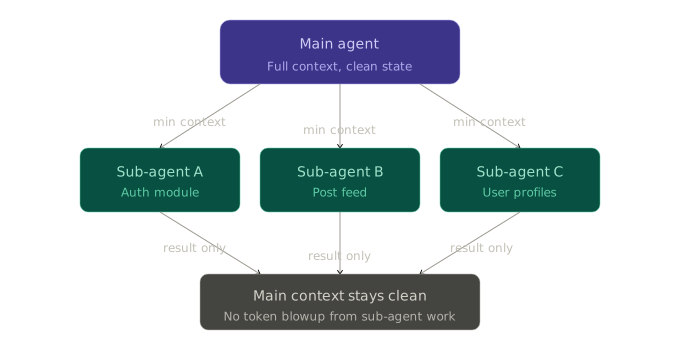
This keeps the main context clean and avoids unnecessary token usage.
Efficient Code Search
Lambda also uses a search tool powered by grep.
Instead of reading entire files to find a small piece of information, the agent can search across the repository and directly jump to relevant results. This saves a lot of tokens and reduces unnecessary context loading.
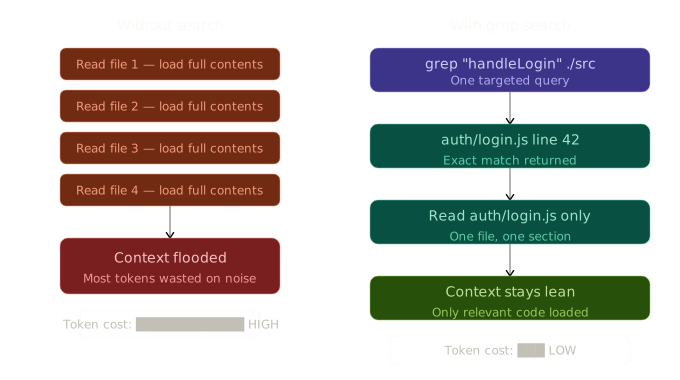
The agent only reads the exact file or section it needs, instead of scanning everything blindly.
Conclusion
Together, the memory system, sliding window, sub-agent design, and efficient search make Lambda practical and scalable. It can handle larger tasks without