I Built a Real-Time Voice AI Agent for Zomato Customer Support — Here’s How It Works

Customer support phone calls are painful. You wait on hold, repeat yourself three times, and half the time the agent can’t even help. So I thought — what if I built an AI that could handle this entire thing over a live voice call, in real time?
That’s exactly what this project is. A voice-powered AI support agent for Zomato that you can talk to straight from the browser. No waiting. No hold music. Just a real conversation with an AI that can actually pull up your orders, process refunds, and file complaints while you’re still on the call.
Let me walk you through how I built it, what went wrong, and what I learned.
The Idea
The concept is straightforward. You open the app, you see your orders and wallet balance, and there’s a big “Call Voice Agent” button. You tap it, your browser asks for mic permission, and within a second you’re talking to an AI agent. It listens to you, understands what you want, looks things up in the database, and talks back — all in real time.
It sounds simple when I say it like that, but getting real-time voice to work in a browser, streaming through a backend, connected to an AI model that can also call functions — that took some figuring out.
The Stack
Here’s what I used:
- Frontend: Next.js 16 with React 19. It’s a single-page app that shows your profile, orders, and the voice call overlay.
- Voice Server: A Python backend built with FastAPI. This is the brain. It sits between the browser and Google’s Gemini API, streaming audio both ways.
- AI Model: Google’s Gemini Multimodal Live API — specifically
gemini-3.1-flash-live-preview. This is what makes the magic happen. It takes in audio, understands it, decides what to do, and responds with audio. - Database: MongoDB Atlas, accessed through Mongoose on the frontend side and Motor (async driver) on the Python side.
- Deployment: The frontend is on Vercel, the voice server runs on Google Cloud Run in a Docker container.
How the Voice Call Actually Works
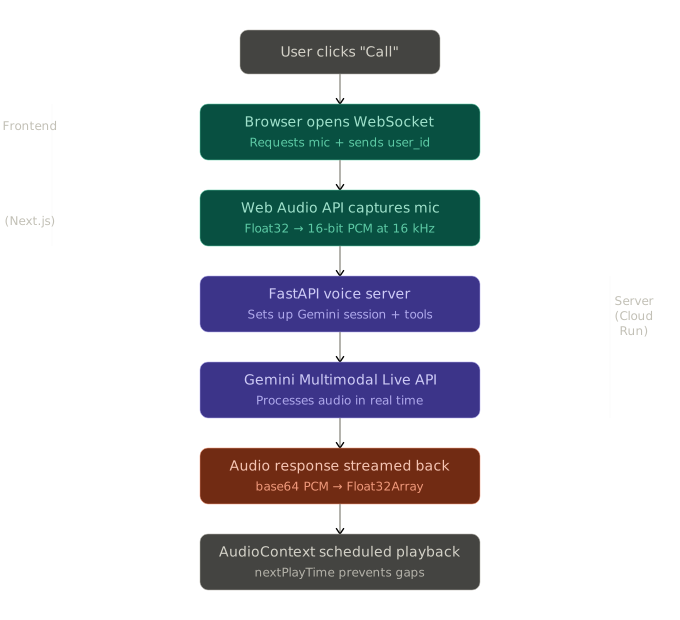
This is the interesting part. Let me break it down step by step.
1. You Click “Call”
When you hit the button, the browser does two things: it opens a WebSocket connection to my voice server, and it asks for microphone access. The WebSocket URL includes your user_id so the server knows who’s calling.
2. Your Voice Gets Captured
I use the Web Audio API — specifically a ScriptProcessorNode — to grab raw audio from your microphone. The audio comes in as floating point samples, and I convert them to 16-bit PCM at 16 kHz. That’s what Gemini expects.
Every time the audio processor fires (every 4096 samples), I take that chunk and send it straight over the WebSocket as a binary frame.
3. The Server Proxies to Gemini
My FastAPI server receives those audio chunks and forwards them to Google’s Gemini Live API over a second WebSocket connection. But it doesn’t just blindly forward audio — it first sets up the session with a system prompt and tool declarations.
The setup message tells Gemini: “You’re a Zomato support agent. You have these tools available. Respond with audio. Use the Kore voice.”
4. Gemini Thinks and Responds
Gemini processes the audio in real time. It can do three things:
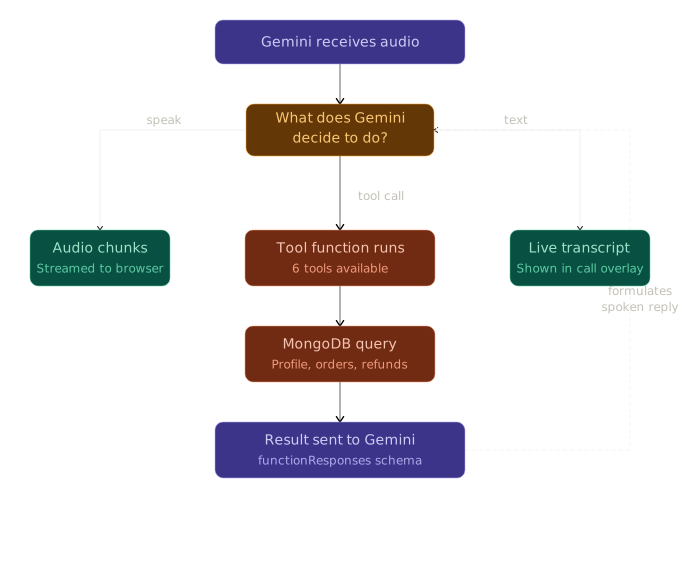
- Talk back — It generates audio responses and sends them as base64-encoded PCM. My server decodes them and pushes the raw bytes to the browser.
- Call a tool — If you ask about your order, Gemini decides to call
check_order_status. The tool call comes as JSON. My server runs the function, gets the result from MongoDB, and sends it back to Gemini so it can formulate a spoken response. - Send text — Sometimes Gemini sends text alongside audio. I display this in the call overlay as a live transcript.
5. You Hear the Response
Back in the browser, audio chunks arrive as binary WebSocket frames. I decode them into Float32Array, create an AudioBuffer, and schedule playback using AudioContext. I keep a nextPlayTime reference to make sure chunks play back-to-back without gaps or overlaps. That way it sounds like a smooth, continuous voice.
6. You Hang Up
When you click “End Call”, the WebSocket closes, the microphone stream stops, and the audio context shuts down. Clean and simple.
The Tools — Where It Gets Smart
The voice agent isn’t just a chatbot that talks. It has six tools it can use during the conversation, and Gemini decides when to call them based on what you’re saying.
Looking Up Your Profile
When you call in, the agent usually starts by pulling your profile. It gets your name, phone number, wallet balance, how many orders you’ve placed, and your total lifetime spend. That last number matters because it determines your “customer tier” — and that affects how much refund you can get.
Checking Orders
If you say something like “What’s happening with my order?”, the agent calls check_order_status. This pulls all your orders sorted by most recent, shows their status, and — crucially — tells the agent whether each order is still within the 2-hour refund window.
Processing Refunds
This is where the business logic lives. I didn’t want the agent to just hand out full refunds to everyone. That’s not how real support works. So I built an LTV-based refund system:
- If you’ve spent ₹10,000+ on Zomato overall, you get a 100% refund.
- ₹5,000+? You get 75%.
- ₹2,000+? 50%.
- New customer? 30%.
And there’s a hard rule: refunds only work within 2 hours of delivery. If the order is older than that, the agent politely explains the policy and offers to file a complaint instead.
The system prompt also instructs the agent to try alternatives before processing a refund. It’ll suggest filing a complaint or ask if a re-order would help. Only if you insist does it actually process the refund.
Filing Complaints
Complaints have no time limit. Whether your order was yesterday or last week, the agent can file one. It categorizes the complaint — food quality, late delivery, missing items, wrong order, hygiene, or other — and stores it in the database.
Escalating to a Human
If you’re really upset and the AI can’t help, or if you just want to talk to a person, the agent can create an escalation ticket. It summarizes the issue and flags it for human review.
The Frontend
I wanted the app to feel native, like an iOS app. No clunky web vibes. So I went with a clean design:
- A frosted glass header with a live indicator dot that pulses green when you’re on a call
- A wallet card at the top showing your balance in a red gradient (Zomato’s brand color)
- Order cards with color-coded status badges — green for delivered, orange for preparing, red for cancelled, blue for refund processing
- A full-screen dark call overlay when you’re on a call, with animated concentric rings around a mic icon
The whole thing is a single page. No routing. You see your orders, you call the agent, you see the result. That’s it.
I also added two utility buttons: “Seed DB” to populate the database with test data, and “Switch User” to jump between five different test accounts. These are handy for demos.
The System Prompt
Getting the AI to behave like a real support agent took a lot of prompt work. Some things I found important:
Keep it concise. In a voice call, nobody wants to hear a paragraph. I told the agent to keep responses extremely short and conversational. Fillers like “Let me pull that up” before a tool call make it feel natural.
Don’t read IDs out loud. Nobody wants to hear “Your order number one two three four five from…”. I configured it to say “your recent order from Biryani By Kilo” instead.
Don’t over-apologize. One “I’m sorry about that” is fine. Five is annoying.
Minimize refunds. The agent’s job is to resolve issues, but the business goal is to minimize refund costs. So it tries alternatives first. This is realistic — real support teams operate the same way.
Deployment
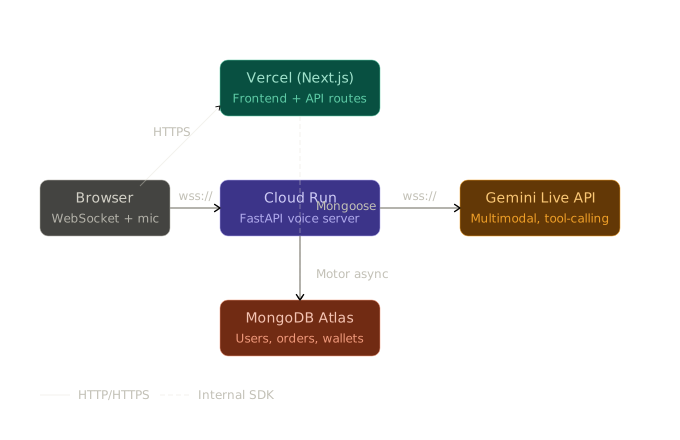
The frontend goes to Vercel. It’s a Next.js app, so that’s the natural choice. I set MONGODB_URI and NEXT_PUBLIC_VOICE_AGENT_URL as environment variables in the Vercel dashboard, and it just works.
The voice server goes to Google Cloud Run. I wrote a simple Dockerfile — Python 3.11 slim image, install dependencies, run Uvicorn. Cloud Run sets the PORT env variable automatically, and the Dockerfile picks it up.
The deploy command is one line:
gcloud run deploy voice-server-agent \
  --source . \
  --region europe-west1 \
  --allow-unauthenticated \
  --set-env-vars "GEMINI_API_KEY=...,MONGODB_URI=..."
One thing that tripped me up: Cloud Run does support WebSockets, but you need to make sure the client connects with the right URL scheme (wss://) and that your server handles the connection upgrade properly. FastAPI handles this natively, so it wasn’t too bad once I figured out the routing.
Problems I Ran Into
The 403 WebSocket Error
When I first deployed to Cloud Run, WebSocket connections were returning 403. Turns out, I needed to make sure the service allows unauthenticated access and that I wasn’t accidentally blocking the WebSocket upgrade with CORS middleware. Adding allow_origins=["*"] to the CORS config fixed it.
Audio Gaps and Choppy Playback
Early on, the audio playback on the browser side was choppy. The problem was that I was playing each audio chunk immediately when it arrived, without scheduling. Once I started tracking nextPlayTime and scheduling each chunk to play right after the previous one finishes, the audio became smooth.
The Gemini API Format
The Gemini Multimodal Live API uses a specific format for tool responses. Getting the schema right — especially the toolResponse.functionResponses structure with id, name, and response.result — took some debugging. The error messages from the API aren’t always helpful, so I had to rely on the docs and trial and error.
MongoDB Connection Caching
In Next.js, every API route runs in its own context, and during development with hot reload, you can end up opening dozens of MongoDB connections. I used the standard pattern of caching the connection on global to prevent this.
What I’d Do Differently
If I were starting over, a few things I’d change:
- Use
AudioWorkletinstead ofScriptProcessorNode. TheScriptProcessorNodeAPI is deprecated. It still works fine, butAudioWorkletruns on a separate thread and would be more performant. - Add conversation memory. Right now, each call starts fresh. If you call back, the agent doesn’t remember your previous conversation. Storing transcripts and providing them as context in the system prompt would make repeat calls much smoother.
- Better error recovery. If the Gemini connection drops mid-call, the user just sees “Connection failed.” I’d want to auto-reconnect or at least give a clearer indication of what happened.
- VAD (Voice Activity Detection). Right now, the mic is always streaming. Adding client-side VAD would reduce bandwidth and improve Gemini’s response timing, since it wouldn’t have to process silence.
Wrapping Up
This project was a great exercise in stitching together a bunch of modern tools — real-time WebSockets, a multimodal AI model, async database queries, and a clean frontend — into something that actually feels like a product.
The Gemini Multimodal Live API is genuinely impressive. The fact that you can stream audio in, get audio back, and have the model call functions mid-conversation — all in real time — opens up a lot of possibilities beyond customer support. Think voice-controlled dashboards, real-time translators, or AI-powered phone trees.
If you want to try it out, the code is open source. The frontend is a Next.js app, the backend is a Python server, and everything runs on free tiers (Vercel + Cloud Run + MongoDB Atlas free tier). Clone it, seed the database, and start talking.
Built by Ayush Ranjan